Properties by category
See the Map Contents option (at the top right of the map) to control the layers which are displayed on the map. This includes the option to switch individual Agencies' properties on/off.
- use the checkboxes to switch individual layers on/off
- hold the CTRL key while clicking to toggle all layers on/off
- some layers may not be displayed at all scales - try zooming in if the layer cannot be seen

- Incomplete properties are those properties which do not contain records for all constituent lots
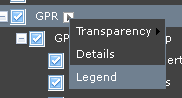
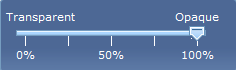
- hover over the layer name, then click the small triangle to access the Legend and Transparency controls: